
If you’ve ever wondered how a live camera feed, a cable box, or a production switcher ends up as a channel you can watch through an IPTV app, the answer is a device called an IPTV encoder. It’s one of the least talked-about pieces of the streaming chain, but without it, none of the channels in your playlist would exist in the first place.
This guide breaks down what an IPTV encoder actually does, the different types you’ll come across (HDMI, SDI, and multi-channel units), and what to look for if you’re evaluating one for a project.
What Is an IPTV Encoder?
An IPTV encoder is a hardware device or software tool that captures a raw video signal — from a camera, satellite receiver, cable box, or media server — and compresses it into a digital format that can be streamed over an IP network. It sits at the very start of the IPTV delivery chain, converting analog or uncompressed digital video into compressed streams like H.264 or H.265 (HEVC), then packages that stream into protocols such as HLS, RTMP, RTSP, UDP, or SRT so it can travel across the internet or a private network to set-top boxes, apps, and smart TVs.
In simple terms: no encoder, no stream. Everything downstream — the middleware, the M3U playlist, the player app — depends on the encoder producing a clean, correctly formatted stream in the first place.
How an IPTV Encoder Works
The encoding process generally follows four steps:
- Capture – The encoder receives a video signal through an input like HDMI or SDI.
- Compress – Using a codec (typically H.264/AVC or H.265/HEVC), the encoder reduces the file size dramatically while preserving visual quality.
- Package – The compressed video is wrapped into a streaming format such as HLS (.m3u8), RTMP, or SRT.
- Transmit – The packaged stream is pushed to a media server, CDN, or directly to IPTV middleware for distribution to end users.
Modern IPTV video encoders handle all four steps in real time, often with latency as low as a few hundred milliseconds, which is essential for live sports and events where delay is noticeable.
Types of IPTV Encoders
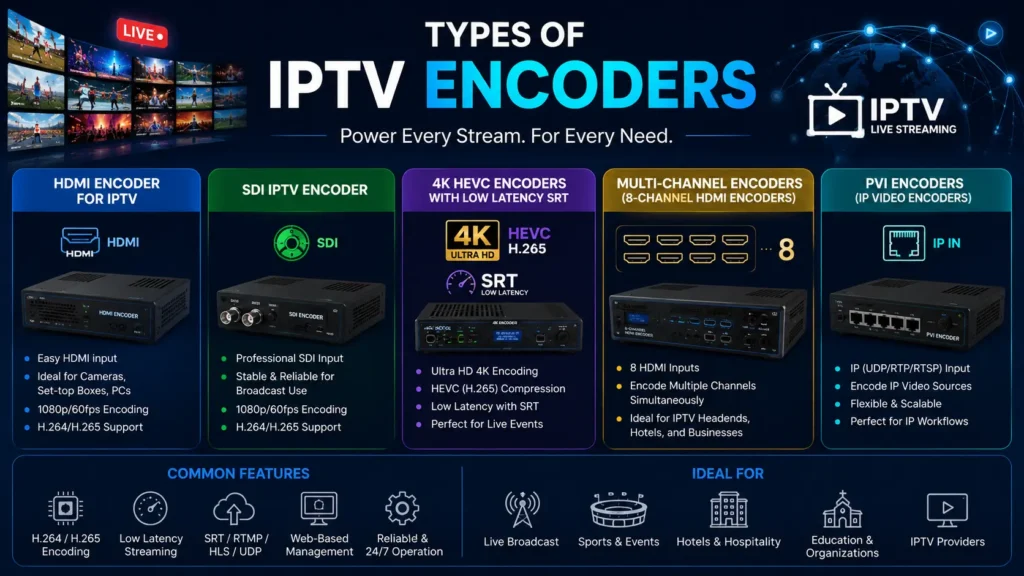
HDMI Encoder for IPTV
An HDMI encoder for IPTV takes a standard HDMI source — a camera, a Blu-ray player, a computer, or a set-top box — and converts it into an IP stream. This is the most common entry point for small productions, church broadcasts, local channel operators, and anyone converting existing HDMI hardware into a network-deliverable feed. An HDMI to IPTV encoder is typically compact, often rack-mountable, and increasingly supports 4K input even on budget models.
SDI IPTV Encoder
Professional and broadcast environments more often rely on an SDI IPTV encoder. SDI (Serial Digital Interface) is the standard for professional cameras, switchers, and studio equipment because it supports longer cable runs and more robust signal integrity than HDMI. SDI encoders are common in TV studios, stadiums, and outside broadcast trucks where reliability over distance matters more than convenience.
Many professional-grade IPTV encoders now include both HDMI and SDI inputs on the same unit, giving operators flexibility to switch sources without swapping hardware.
4K HEVC Encoders with Low Latency SRT
For higher-end deployments, a 4K HEVC HDMI encoder with low latency SRT support has become the standard for anyone streaming 4K content over unreliable networks. HEVC (H.265) compresses video roughly twice as efficiently as H.264, meaning a 4K stream can be delivered at a fraction of the bitrate a 4K H.264 stream would need. SRT (Secure Reliable Transport) adds encryption and packet-loss recovery, making it a popular choice for contribution feeds sent over the public internet rather than dedicated fiber lines.
Multi-Channel Encoders (8-Channel HDMI Encoders)
Larger operations — hotel IPTV systems, multi-camera venues, or providers running many channels from a single headend — typically use a multi-input unit like an 8-channel HDMI encoder for IPTV. These take up to eight simultaneous HDMI (or SDI) sources and output them as independent streams, usually in M3U8/HLS format so they can be dropped straight into IPTV middleware or a playlist. This dramatically reduces rack space and power consumption compared to running eight separate single-channel encoders.
PVI Encoders
Some PVI encoder IPTV models are used specifically for advertising insertion and channel branding — inserting logos, watermarks, or programmed ad breaks into a live feed before or during encoding. These are more specialized and typically appear in commercial headend setups rather than small-scale streaming.
Hardware vs. Software Encoders
- Hardware encoders are dedicated physical devices with built-in encoding chips. They’re generally more stable for 24/7 operation, produce lower and more consistent latency, and don’t compete with other applications for CPU resources.
- Software encoders (like OBS or FFmpeg) run on a general-purpose computer and offer more flexibility for graphics overlays, multi-source switching, and custom workflows, at the cost of needing dedicated processing power and more hands-on management.
Most professional IPTV operations use hardware encoders for their live channel lineup and reserve software encoders for one-off streams or production flexibility.
Key Specs to Look at When Choosing an IPTV Encoder
- Input type – HDMI, SDI, or both, depending on your source equipment
- Codec support – H.264 for compatibility, H.265/HEVC for bandwidth efficiency
- Resolution – 1080p is standard; 4K support matters increasingly for sports and premium content
- Latency – Critical for live events; look for sub-second latency specs
- Protocol support – HLS/M3U8 for broad player compatibility, SRT or RTMP for contribution feeds
- Channel density – Single-channel units for small setups, 4–8 channel units for larger headends
- Network output options – Unicast vs. multicast support, depending on your distribution model
Where the Encoder Fits in the Bigger Picture
The encoder is only the first link in the chain. Once a stream is encoded, it typically moves to a media server or middleware platform, gets organized into a playlist, and is distributed to end devices. If you’re curious how the playlist side of things works — including how M3U links and MAC-address-based activation differ — we’ve covered that in detail in our M3U vs. MAC address activation guide.
And if you’re looking at the encoder as part of building out a larger IPTV operation rather than a single stream, our guide to starting an IPTV business covers the rest of the infrastructure stack — middleware, hosting, and content licensing — that sits alongside the encoding layer.
Final Thoughts
Whether you’re setting up a single HDMI camera feed or building a multi-channel headend with 4K HEVC and SRT support, the encoder is the piece of hardware that makes everything else possible. Matching the right encoder — HDMI vs. SDI, single-channel vs. 8-channel, H.264 vs. HEVC — to your actual source equipment and distribution goals will save you a lot of headaches (and bandwidth) down the line.